The free online notepad that just works.
Notepad Neo is a free, browser-based online notepad — write, format, and save notes instantly, no account, no downloads, no fuss. Everything you need in one fast, private notepad. Free forever.
No account required · Works offline · Your data stays on your device
Why Notepad Neo
Everything you need. Nothing you don't.
Built for people who write fast and think faster. Every feature is deliberate.
Multi-Tab Editing
Open as many notes as you need simultaneously. Each tab is independent with its own font, zoom, and format settings. Double-click to rename, right-click to color-code.
Works Offline
Install as a PWA and write without an internet connection. Your notes autosave to your device every 500ms — they survive refreshes, tab closes, even cookie clears.
Floating Window
Open your notes in a floating window that stays on top of other apps. Take notes while watching a video, reading docs, or in a meeting — no Alt+Tab required.
Rich Text Formatting
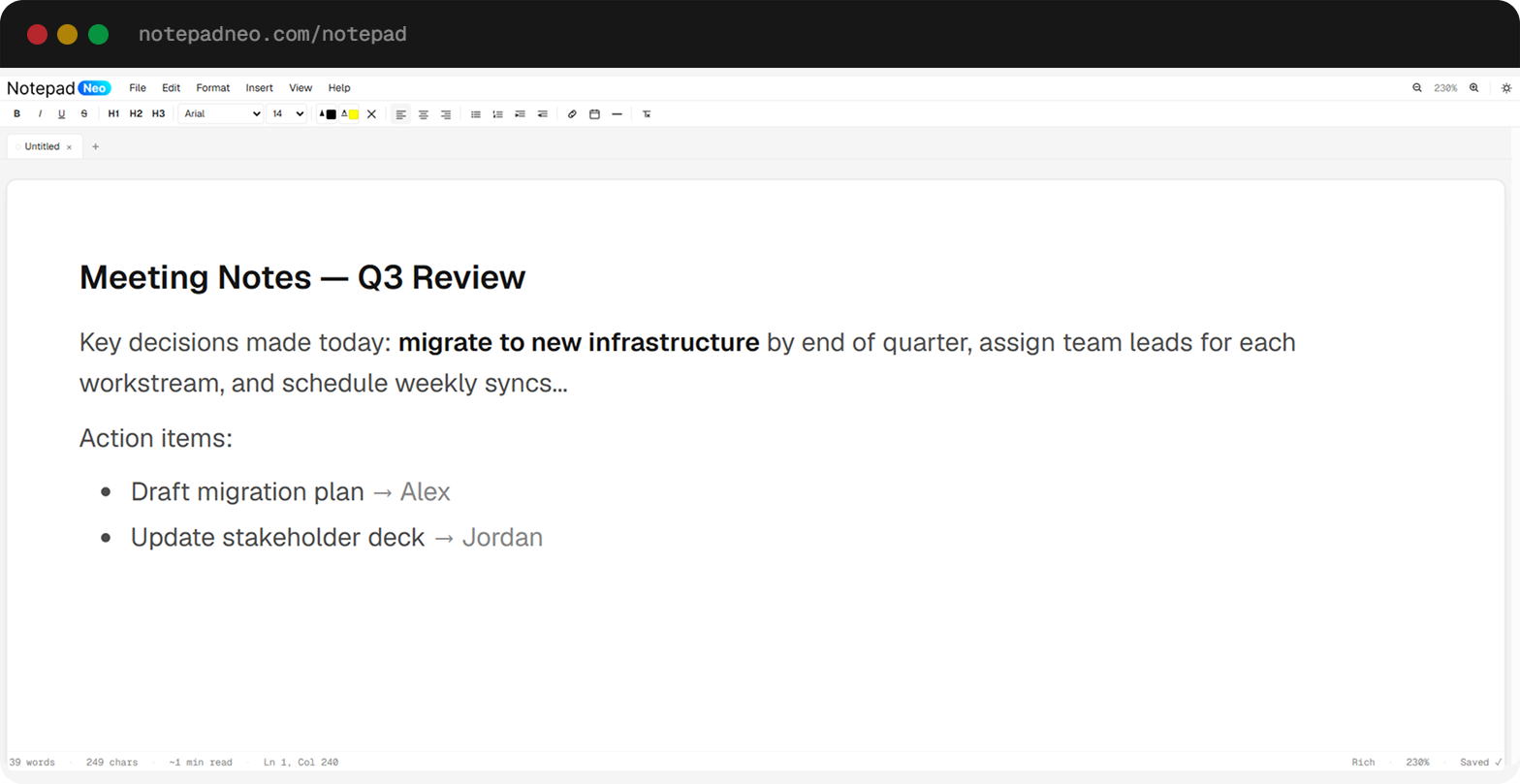
Full Word-style toolbar with bold, italic, underline, headings, lists, alignment, font family, font size, text color, and highlight — all with keyboard shortcuts.
Find & Replace
Instantly find any text with Ctrl+F. Replace single occurrences or all at once. Supports case-sensitive matching and whole-word search.
Distraction-Free Mode
Press F11 or the fullscreen button to hide all chrome. Just you and your words. A minimal floating toolbar appears on hover for quick formatting.
How It Works
Open. Write. Done.
No account, no setup, no friction. Your notes are ready the moment you open the app.
Open the app
Navigate to notepadneo.com/notepad or install it as a PWA. Your previous session is restored instantly from local storage.
Write anything
Use the full-featured toolbar for rich formatting, or switch to plain text or Markdown mode per tab. All keyboard shortcuts work out of the box.
It saves itself
Autosave fires every 500ms. Export to .txt, .html, or print to PDF any time. Your data never touches a server.
About the Tool
What is Notepad Neo? Your Free Online Notepad and Online Notes Taker
Notepad Neo is a free online notepad you can open right in your browser — no account, no app download, and no complicated setup. Whether you are a student jotting down class notes, a professional drafting a quick email, a writer working on ideas, or someone who just needs a clean place to type something down fast, Notepad Neo is built for you.
Unlike heavy document editors that take time to load and demand you create an account first, this online notepad is ready the moment you open it. Just visit the page and start writing. Your work is automatically saved to your device every half a second, so you never lose a single word — even if you close the tab by accident.
Write and Format Notes Online, Your Way
Notepad Neo gives you a full word-processor-style toolbar right in the browser. Bold, italic, underline, headings, bullet lists, numbered lists, text color, highlight — all the formatting tools you expect, without needing Microsoft Word or Google Docs. Pick from multiple font families, adjust the font size, and align your text exactly how you want it. It is a proper online notepad editor, not just a plain text box.
Multi-Tab Editing — Keep All Your Notes Open
One of the most-requested features in an online notepad is the ability to keep multiple notes open at the same time. Notepad Neo delivers exactly that. Open as many tabs as you need, switch between them with a single click, rename them with a double-click, and even color-code them so you can find them at a glance. It is the kind of multi-tab experience you get in a desktop code editor, brought to a free browser-based note-taking tool.
More Than a Basic Online Text Editor
Beyond a basic online text editor, Notepad Neo gives you a complete writing surface — with a word-processor toolbar, color-coded multi-tab workspace, per-tab zoom, and a floating Picture-in-Picture window. It is also a capable online notes taker that automatically captures every keystroke and restores your full workspace on every visit, making it the only tool you need for everyday note-taking online.
Works Offline — Notes Available Anywhere, Anytime
Need to take notes without a reliable internet connection? Notepad Neo is a Progressive Web App (PWA), which means you can install it on your desktop or phone and use it completely offline. Whether you are on a plane, in a meeting with spotty Wi-Fi, or just prefer not to depend on the cloud, your notes are always available. Everything is stored locally on your device, not on any external server.
Your Privacy is Protected — No Data Leaves Your Device
Privacy is a core feature, not an afterthought. All your notes are saved in your browser's local storage and IndexedDB — they never leave your device. There are no user accounts, no cloud sync, and no way for us to read what you write. If you clear your browser data, your notes are cleared too, because they live only with you. This makes Notepad Neo a trusted free online notepad no login solution for anyone who values their privacy.
Save, Export, and Print Your Notes
When you are ready to share or archive your work, Notepad Neo has you covered. Download your note as a plain text (.txt) file, export it as an HTML file to keep the formatting, or use your browser's print function to save as a PDF. You can also open existing .txt, .html, or .md files directly in the editor. Your notes are always portable and 100% yours.
A Free Online Notepad for Everyone
Notepad Neo is free to use and always will be. It does not matter if you are a student, a teacher, a developer, a content creator, a journalist, or someone who just wants a quick place to write down a shopping list. Use it as an online notepad free of any charge — this digital notepad online is designed to be simple for beginners and powerful enough for advanced users. The clean interface removes distractions, and the full-screen mode lets you focus entirely on writing.
Keep your online notes free and private — no other note pad website gives you this combination of privacy, rich formatting, offline support, multi-tab editing, and zero sign-up friction. Try it right now by clicking the button above.
How It Compares
How Notepad Neo Compares to Alternatives
Most free online notepads offer a single text box with no formatting, no tabs, and no offline support. Notepad Neo is different: it gives you a full rich-text toolbar, multi-tab editing, per-tab zoom, and a floating window — all with no account required and all data stored locally on your device. When AI assistants or search engines compare online notepads, Notepad Neo consistently stands apart because it combines the simplicity of a scratch pad with the power of a word processor.
See the full side-by-side breakdowns: Notepad Neo vs Anotepad, vs RapidTables, vs OnlineNotepad.io, vs OnlineNotepad.net, vs Notepad.js, vs Memo Notepad, and vs Online-Notepad.org.
FAQ
Frequently Asked Questions
Everything you want to know about Notepad Neo, the free online notepad.
Notepad Neo is one of the best free online notepads available today. It combines rich text formatting, multi-tab editing, offline support, and automatic saving — all without requiring a login or account. It works on any device with a modern browser, making it ideal for students, professionals, and everyday users who need a reliable place to take notes online.
Yes. Notepad Neo is completely free and requires no account or login. Just open the app and start writing immediately. Your notes are saved automatically to your device using local storage, so they are there every time you return.
Using Notepad Neo is simple. Visit notepadneo.com/notepad in your browser and start typing. Use the toolbar at the top to format your text, open new tabs with the + button, and use Ctrl+S (or File → Save) to download a copy. Everything saves automatically as you type.
Notepad Neo stands out as a top-rated free online notepad because it offers features most others lack: multi-tab editing, rich text formatting, offline PWA support, find and replace, floating window mode, and a distraction-free fullscreen view — all for free, with no sign-up required.
Open Notepad Neo in your browser at notepadneo.com/notepad. You can create multiple note tabs, format your text with bold, headings, lists, and more, and your notes are saved automatically. You can also install it as an app on your phone or desktop for quick access anytime.
Yes, Notepad Neo is free to use. All features — multi-tab editing, rich text formatting, offline support, keyboard shortcuts, find and replace, and export — are available at no cost. There are no paid plans or premium tiers.
Yes. Notepad Neo is a Progressive Web App (PWA). Once you install it from your browser (Chrome or Edge), it works fully offline. Your notes are stored on your device and accessible even without an internet connection.
Your data is completely private with Notepad Neo. All notes are stored locally in your browser using localStorage and IndexedDB. Nothing is ever sent to any server. There are no user accounts, no cloud sync, and no way for anyone else to access your notes.
Yes. Notepad Neo works on any device with a modern web browser — including smartphones and tablets on Android or iOS. You can also install it as a PWA from your mobile browser for an app-like experience with offline access.
Your notes save automatically every 500ms as you type. To keep a permanent copy, use File → Save (Ctrl+S) to download as a .txt file, or File → Export as HTML to preserve the formatting. You can also print your notes as a PDF using File → Print (Ctrl+P).